Monday, June 17, 2013

Sanborn Fire Insurance Maps

Lauren Landis, Genealogy Services
Stark County District Library

Monday, June 3, 2013

Essential Skeleton App

Hi Everyone,
Essential Skeleton is a fully functional (free) app covering a 3D view of the anatomy of a human skeleton for iOS.  With a simple tap you can study the skeletal system, learn more about its systems, and even take a quiz.


Once you have downloaded your Essential Skeleton just tap the app icon to open.  An image of the human skeleton will appear.
Once the app is fully loaded (only a second or two) the opening page will appear with site navigation options.


NOTE:
To rotate the image, swipe one finger across the image on the screen.
To zoom the image, pinch two fingers across the image to reduce the image size or open two fingers across the screen to enlarge.

Let's begin:
Tap on a section of the skeleton you are interested in learning about.  Note the selected bone will turn a different color highlighting its physical structure.


At the top of the screen you will see a System's Trail.  You can also find additional information options next to selected bone or system.


Tap the speaker to hear a pronunciation, discover the spelling and/or the Latin nomenclature or tap the (i) for more information of the selection bone or system.

 
Tap Hide, Hide Others, Fade, or Fade Others to learn more about bone structure relationships. (Tap the options again to return to original image.)
Hide: The selected image disappears.


Hide Others:  Only the selected image remains.


Fade: The selected image fades.

 
Fade Others:  Only the selected image remains.


Now that you have a basic introduction, why don't you give it a try?  Or venture into some of the additional features listed below.
 
Enjoy,
Dee
 

Additional features include:
- New 3D technology via 3D4Medical's latest graphics engine.
- User friendly and intuitive interface.
- Multiple search options.
- Dynamic quiz function - Drag and Drop and Multi-choice.
- Custom search modes.
- Extensive social media tools and sharing capability. 

Saturday, May 11, 2013

Cool New ReferenceUSA Tool by Norma S.


My friend Kay is taking her 14 year old niece to Boston after school is out both for fun and to learn more about the history of the area. One of the things that her niece likes to do is go clothes shopping at any thrift outlets she can find. So my friend asked me if I could get together a list of thrift stores for them. Since she wasn’t sure yet where they were going to stay I got on ReferenceUSA and set about trying to find her a list with addresses and phone numbers.
 

Kay decided it would be a good idea for her to bring her niece to the library so that she could learn how to find things like this for herself. I showed her how to get to the databases from the SCDL home page and how they were organized. We then pulled up ReferenceUSA and started to hunt for thrift stores in Boston.
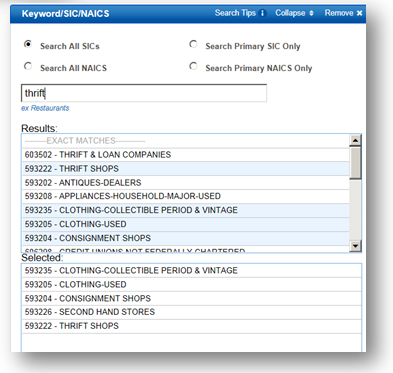
Because this is so specific we decided that a custom search was called for rather then a quick search so we selected Keyword/SIC/NAICS and the city knowing that the last one would also ask for the state.


When we started looking for Thrift stores ReferenceUSA pulled up quite a large list of suggestions under the business type. Since both Kay and Kim like vintage clothing we also included that in our search.
Surprisingly for a city the size of Boston there are only 16 stores of this type that fit into our selected parameters.


I printed out the list for them and because ReferenceUSA has added a couple of new features and one of them is the Heat Map
 
This shows where these stores are located in and around the city so I printed that out for them as well.
 
The map is interactive so you can zoom in and out on the area that you’re interested in.