Showing posts with label iPad. Show all posts

Monday, June 3, 2013

Essential Skeleton App

Hi Everyone,
Essential Skeleton is a fully functional (free) app covering a 3D view of the anatomy of a human skeleton for iOS.  With a simple tap you can study the skeletal system, learn more about its systems, and even take a quiz.


Once you have downloaded your Essential Skeleton just tap the app icon to open.  An image of the human skeleton will appear.
Once the app is fully loaded (only a second or two) the opening page will appear with site navigation options.


NOTE:
To rotate the image, swipe one finger across the image on the screen.
To zoom the image, pinch two fingers across the image to reduce the image size or open two fingers across the screen to enlarge.

Let's begin:
Tap on a section of the skeleton you are interested in learning about.  Note the selected bone will turn a different color highlighting its physical structure.


At the top of the screen you will see a System's Trail.  You can also find additional information options next to selected bone or system.


Tap the speaker to hear a pronunciation, discover the spelling and/or the Latin nomenclature or tap the (i) for more information of the selection bone or system.

 
Tap Hide, Hide Others, Fade, or Fade Others to learn more about bone structure relationships. (Tap the options again to return to original image.)
Hide: The selected image disappears.


Hide Others:  Only the selected image remains.


Fade: The selected image fades.

 
Fade Others:  Only the selected image remains.


Now that you have a basic introduction, why don't you give it a try?  Or venture into some of the additional features listed below.
 
Enjoy,
Dee
 

Additional features include:
- New 3D technology via 3D4Medical's latest graphics engine.
- User friendly and intuitive interface.
- Multiple search options.
- Dynamic quiz function - Drag and Drop and Multi-choice.
- Custom search modes.
- Extensive social media tools and sharing capability. 

Monday, May 21, 2012

Slide Shark Presentation App

SlideShark
Hi Everyone,
This week's iPad challenge was to find an App for presenting a PowerPoint slide show.  While I tested many, the one that stood out due to easy of use, cost, and storage was Slide Shark by Brainshark, Inc.  Some of the key features include: works with PowerPoint files; preserves animations, fonts, graphics and colors; Tap or Swipe technology; no internet connection required when presenting, presentations are downloaded to the device; share presentation via email or social media.

1.  Locate and download Slide Shark from the Apple App store
2.  The first time you open Slide Shark you will need to create an account
3.  Upload your presentation from your computer using your free online account at www.slideshark.com
4.  Or email the PowerPoint presentation to your iPad or iPhone
5.  If you do not see your presentation in the preview pane, tap the Syncronize button at the top of the screen
NOTE: For an iPad or iPhone you will need a special adaptor for projector viewing

NOTE: Before starting, I recommend taking the short tutorial by Slide Shark.  It will really show you Slide Shark's special features.

Tuesday, April 17, 2012

iPad: Changing your email signature

Have you changed your signature on the email account that you use on your iPad?  Or are you sending items with a signature "sent from your iPad"? 
It is easy to change the signature to something a bit more personal or professional. 
1.  From the Home Screen, locate Settings
2.  Open the iPad settings by gently double tapping on Settings
3.  Tap on the Mail, Contacts, Calendar option from the Settings options list
4.  Tap on the Signatures options found at the bottom of the Mail, Contacts, Calendar options

5.  A keyboard will appear, type the signature that you would like others to see when you send an email.
Now you may press the Home button to go back to your iPad's Home Screen.

Tuesday, November 22, 2011

Amazon Prime Lending vs. Library Lending


Not too long ago we announced with much fanfare that Stark County District Library card holders (and card holders at about 11,000 other libraries) are now able to check out library books to read on their Kindles and Kindle apps.  Here in Stark County, library lending of eBooks has already seen a lot of success, with almost 2,000 downloads in October of 2011. 

But then, earlier this month, Kindle announced that Amazon Prime members will now be able to loan about 5,000 titles directly from Amazon for "free."  First of course, one has to be an Amazon Prime member, which costs $79 dollars a year.

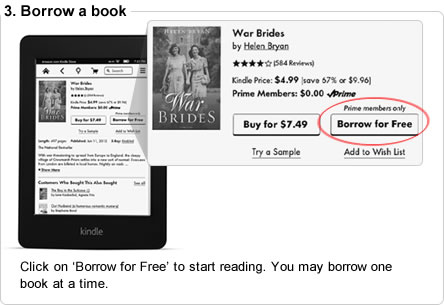
First to discuss exactly what is included in this new deal from Amazon.  When you find a book and go to buy it for your Kindle, if you you are an Amazon Prime member and the book is included in the library, you will be given the option to "Borrow for Free"
Click on ‘Borrow for Free’ to start reading. You may borrow one book at a time.

Here's the caveat- you can only check on one book at a time, and can only check out one book per calender month.  Meaning if you borrow a book on January 1st, finish it and return it, you will not be able to check out another book until February 1st.  No doubt this measure is meant to encourage people to buy books rather than "borrow" them.  Also you can only use this feature if you have a Kindle.  It will not work on Kindle apps for iPhones and iPads.

On the other side, there are library eBooks.  I can only speak for the Ohio eBook Project and the SEO Library Consortium, which is who the Stark County District Library deals with to get eBooks to our customers.  The eBooks and audiobooks on these sites are, unlike Amazon Prime, actually free.  You can also check out up to 10 at a time from each site (so that makes it possible for Stark County Library card holders to check out up to 20 books at a time).  And of course there is no added barrier of only being able to check out one a month.  You can find books to read on Kindles and Kindle apps, as well as books for other eReaders, such as the Nook and iPad. 

But of course the difference between libraries and Amazon is that Amazon exists to make money, whereas libraries exist to promote literacy and access to information.

And so it will be interesting to see how long this new program from Amazon works.  It has already drawn the ire of not only librarians, but authors and publishers who say this lending is a perversion of the contracts they have with Amazon, calling it "an exercise of brute economic power."

This blogger's advice to Amazon is to tread carefully.  There is no such thing as being too big to fail, just ask Netflix.

Monday, October 24, 2011

Where to find those free e-books

Many times I'm asked "Where to find free e-books outside of the library catalog?"  What follows directly is "Are these safe sites?"  While I have my favorites that I have provided in the past, Public Libraries published in its July/August 2011 issue a list of free sites that are great additions to the list:
Baen Books: There are about 120 titles available in the science fiction and fantasy genre for PC or Kindle.
Book Lending: Registration is required.  Supports Kindles and you may lend or borrow a book between other users.
Digital Book Index: This site supports iPad, Kindle, and Nook readers.  You may search by title, author, title and author, or title keyword among its 165,000 digital collection.
E-Discover the Classics: Looking for a great classic but don't want to search hours to find them?  Kindles, iPads, Nooks and many other readers are supported. 
Inkmesh: Free and easy to use, Inkmesh has sort by device, free or for cost e-books.  It hosts about 3,500 e-books in fiction and nonfiction.
Open Library: Need children's books?  Open Library includes title from popular Golden Books.   Formats include but not limited to PDF and EPUB.  Membership required.
Don't forget to check out your local library for their digital collection.