Showing posts with label Ohio Ebook Project. Show all posts

Wednesday, March 7, 2012

Downloading/Installing the Kindle app to your mobile device

Downloading/Installing the Kindle app to your mobile device requires a mobile device with an active app store and wireless connection.
1. Locate the Kindle app in your device app store
2. It is a free app but will still require an active app store account to download
3. Follow the prompts for installing the app on your device
4. Once installation is complete, check your device apps for the Kindle icon
5. Now you may read a Kindle ebook on your mobile device using the Ohio eBook Project and an Amazon account.
Look for more information about Downloading Kindle eBooks in future posts.
Dee

Thursday, December 22, 2011

Ohio eBook Project and Kindles

It is that time of year when people are anxiously awaiting their new readers and other electronic devices which can be used for digital reading materials. Many go directly to the digital store that support their new reader. But give your Stark County District Library's Ohio eBook Project, our digital collection, a try. There are digital materials such as books, audio files, and/or videos ready for downloading. Need a little help getting started? On the SCDL Computer Training Website, you will find materials, website, tutorials, as well as video tutorials on how to use the Ohio eBook Project.

Tuesday, November 22, 2011

Amazon Prime Lending vs. Library Lending


Not too long ago we announced with much fanfare that Stark County District Library card holders (and card holders at about 11,000 other libraries) are now able to check out library books to read on their Kindles and Kindle apps.  Here in Stark County, library lending of eBooks has already seen a lot of success, with almost 2,000 downloads in October of 2011. 

But then, earlier this month, Kindle announced that Amazon Prime members will now be able to loan about 5,000 titles directly from Amazon for "free."  First of course, one has to be an Amazon Prime member, which costs $79 dollars a year.

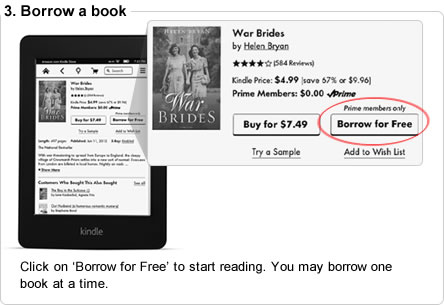
First to discuss exactly what is included in this new deal from Amazon.  When you find a book and go to buy it for your Kindle, if you you are an Amazon Prime member and the book is included in the library, you will be given the option to "Borrow for Free"
Click on ‘Borrow for Free’ to start reading. You may borrow one book at a time.

Here's the caveat- you can only check on one book at a time, and can only check out one book per calender month.  Meaning if you borrow a book on January 1st, finish it and return it, you will not be able to check out another book until February 1st.  No doubt this measure is meant to encourage people to buy books rather than "borrow" them.  Also you can only use this feature if you have a Kindle.  It will not work on Kindle apps for iPhones and iPads.

On the other side, there are library eBooks.  I can only speak for the Ohio eBook Project and the SEO Library Consortium, which is who the Stark County District Library deals with to get eBooks to our customers.  The eBooks and audiobooks on these sites are, unlike Amazon Prime, actually free.  You can also check out up to 10 at a time from each site (so that makes it possible for Stark County Library card holders to check out up to 20 books at a time).  And of course there is no added barrier of only being able to check out one a month.  You can find books to read on Kindles and Kindle apps, as well as books for other eReaders, such as the Nook and iPad. 

But of course the difference between libraries and Amazon is that Amazon exists to make money, whereas libraries exist to promote literacy and access to information.

And so it will be interesting to see how long this new program from Amazon works.  It has already drawn the ire of not only librarians, but authors and publishers who say this lending is a perversion of the contracts they have with Amazon, calling it "an exercise of brute economic power."

This blogger's advice to Amazon is to tread carefully.  There is no such thing as being too big to fail, just ask Netflix.

Thursday, September 22, 2011

Hi Everyone,
I've been testing out the Kindle on the Ohio eBook Project. The Ohio eBook Project is Stark County District Library's catalog for e-resources such as audio books, music, videos, and more. Prior to September 21st, we could not download those e-resources to a Kindle eReader.
I must admit the ease of use is encouraging. Required: a Kindle eReader with WiFi, a computer with Internet connection, and a SCDL (including Massillon and Louisville Public Libraries) library card. Simple use the SCDL catalog or go directly to the Ohio eBook Project website search for your e-resource, follow the prompts, and let the WiFi do the rest. The next time you enter a WiFi zone, your e-resource will download to your Kindle eReader. Or you may also use a USB connection to download immediately.
Very Exciting!
If you would like a Kindle/Ohio eBook Project training/demonstration, look for our training classes in the Stark Scene Newsletter or on our website calendar.

Wednesday, February 23, 2011

Ohio Ebook Project

Now that many of you are using the Ohio Ebook Project for your ebook needs, I wanted to give you a couple of tips on using the site.
1. If you click on the Advanced Search you may limit your search to specific formats. For example: Use the drop down arrow next to Format and select Acrobat PDF or EPUB to limit the search to only those types.
2. You do not need to type in an author, publisher, title, keyword, etc... to generate a search. Simply select a format option.
3. If you scroll to the bottom of the Advanced Search page, you will find a box to check for searching only items that are available.
4. You may return books before they are due. This will allow you to borrow more items.