Showing posts with label technology. Show all posts

Friday, August 24, 2012

Shazam


Hi Everyone,
During the evening, I often times log onto one of our local radio stations to listen to music.  I sit in my comfy chair with a diet pop and a good read or my iPad.  During that time, it never fails, I hear a song that I would like to put in one of my playlists.  Unfortunately, the DJ doesn't always tell you the name of the song or the artist.  This can be an oldies favorite or a new song by a new artists that I would like to listen to again. Tracking it down isn't always easy until I discovered Shazam.
Shazam is a free app available for multiple platforms such as Android and Apple.  It will record a small sample of the music while it is being played and then search for the song and artists.  Once Shazam identifies the title and artist, you have the option of being redirected to the iTunes store, YouTube Videos as well as other site options for purchasing.  I, however, go and search the SCDL online catalog to see if we have it first.  I like to make sure it is really something I would like to buy or just listen to now and again.
 
To check out this month's featured app:
Visit your device app store and type in the keyword Shazam to locate and download the free app.
 
How to use the Shazam app:
1.  Start playing a piece of music from the radio or other source.
2. Open up the Shazam app and tap the launch button.
 
 
3. You will see a Listening screen with a spinning wheel that looks like a record.
 
NOTE:  You must not talk while Shazam is listening to the music. 
4.  After Shazam identifies the song and/or artist a new screen will appear with detailed information about the artists, track preview option, your present and previous searches (tags), purchasing, sharing, and video information.
 
 
5. There is also a Similar option .  Tap it to find other songs and artistics in the same genre.
 
Enjoy the Music!
 

Tuesday, November 22, 2011

Amazon Prime Lending vs. Library Lending


Not too long ago we announced with much fanfare that Stark County District Library card holders (and card holders at about 11,000 other libraries) are now able to check out library books to read on their Kindles and Kindle apps.  Here in Stark County, library lending of eBooks has already seen a lot of success, with almost 2,000 downloads in October of 2011. 

But then, earlier this month, Kindle announced that Amazon Prime members will now be able to loan about 5,000 titles directly from Amazon for "free."  First of course, one has to be an Amazon Prime member, which costs $79 dollars a year.

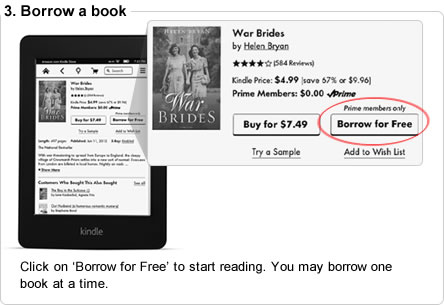
First to discuss exactly what is included in this new deal from Amazon.  When you find a book and go to buy it for your Kindle, if you you are an Amazon Prime member and the book is included in the library, you will be given the option to "Borrow for Free"
Click on ‘Borrow for Free’ to start reading. You may borrow one book at a time.

Here's the caveat- you can only check on one book at a time, and can only check out one book per calender month.  Meaning if you borrow a book on January 1st, finish it and return it, you will not be able to check out another book until February 1st.  No doubt this measure is meant to encourage people to buy books rather than "borrow" them.  Also you can only use this feature if you have a Kindle.  It will not work on Kindle apps for iPhones and iPads.

On the other side, there are library eBooks.  I can only speak for the Ohio eBook Project and the SEO Library Consortium, which is who the Stark County District Library deals with to get eBooks to our customers.  The eBooks and audiobooks on these sites are, unlike Amazon Prime, actually free.  You can also check out up to 10 at a time from each site (so that makes it possible for Stark County Library card holders to check out up to 20 books at a time).  And of course there is no added barrier of only being able to check out one a month.  You can find books to read on Kindles and Kindle apps, as well as books for other eReaders, such as the Nook and iPad. 

But of course the difference between libraries and Amazon is that Amazon exists to make money, whereas libraries exist to promote literacy and access to information.

And so it will be interesting to see how long this new program from Amazon works.  It has already drawn the ire of not only librarians, but authors and publishers who say this lending is a perversion of the contracts they have with Amazon, calling it "an exercise of brute economic power."

This blogger's advice to Amazon is to tread carefully.  There is no such thing as being too big to fail, just ask Netflix.

Wednesday, October 12, 2011

Do you know about CTRL + F?


In a recent interview with Dan Russell, a search anthropologist for Google, the Atlantic's Alexis Madigral learned something startling- about 90% of people do not use the CTRL + F function when searching.  CTRL + F is an incredibly useful tool when browsing the Web, reading or writing documents and browsing PDFs.  It is a keyboard shortcut which opens your computer's "find" function.  Here is what it can be used for:

Take, for example, the website craigslist.org.  This is a website that is useful for buying and selling, trading, finding apartments and looking for jobs.  There is a craigslist specific to most major cities in the United States.  If you go to the link posted above, you will be taken to the main page, which lists every city-specific website.  To find Canton, OH specifically, you can do one of two things.  One- scroll through the whole site and browse or two- use the function CTRL + F.  When you press and hold the CTRL key and the F key AT THE SAME TIME, a box will appear on your screen (could be top, bottom or floating depending on your web browser) which looks something like this:


In our craigslist example, you would type "canton" into the find box and click "next".  You will see that all instances of the word "canton" will be highlighted on your screen.  Keep clicking next to jump from canton to canton until you find the right one.


And THAT, in a nutshell, is the CTRL + F feature.  As mentioned, you can use CTRL + F on the Web, in Word documents and in PDFs.  It is dead useful if you need to find specific information admist a large chunk of information.

Now of course, nothing in technology is perfect.  Some limitations to CTRL + F:

1) Your spelling needs to be spot on.  There is no "did you mean..." like on Google.  If you spelled it wrong, you will not find it.
2) It only finds exact phrases.  If, using our example, I had searched "canton ohio" instead of just "canton", I would have had no results because nowhere on that page are the words canton and ohio right next to each other.

Despite these limitations, overall CTRL + F makes finding information much, much easier.