http://nhdbooks.blogspot.com/2011/12/installing-overdrive-media-console-on.html
Would you like to read EPUB books on your Kindle Fire. You will need to install OverDrive Media Console on your Fire. These instructions were found on New Hampshire's Downloadable Books Blog. Enjoy!
Showing posts with label Fire. Show all posts
Showing posts with label Fire. Show all posts
Wednesday, January 11, 2012

Tuesday, November 22, 2011
Amazon Prime Lending vs. Library Lending
Not too long ago we announced with much fanfare that Stark County District Library card holders (and card holders at about 11,000 other libraries) are now able to check out library books to read on their Kindles and Kindle apps. Here in Stark County, library lending of eBooks has already seen a lot of success, with almost 2,000 downloads in October of 2011.
But then, earlier this month, Kindle announced that Amazon Prime members will now be able to loan about 5,000 titles directly from Amazon for "free." First of course, one has to be an Amazon Prime member, which costs $79 dollars a year.
First to discuss exactly what is included in this new deal from Amazon. When you find a book and go to buy it for your Kindle, if you you are an Amazon Prime member and the book is included in the library, you will be given the option to "Borrow for Free"
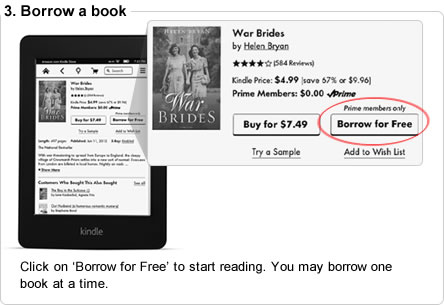
Here's the caveat- you can only check on one book at a time, and can only check out one book per calender month. Meaning if you borrow a book on January 1st, finish it and return it, you will not be able to check out another book until February 1st. No doubt this measure is meant to encourage people to buy books rather than "borrow" them. Also you can only use this feature if you have a Kindle. It will not work on Kindle apps for iPhones and iPads.
On the other side, there are library eBooks. I can only speak for the Ohio eBook Project and the SEO Library Consortium, which is who the Stark County District Library deals with to get eBooks to our customers. The eBooks and audiobooks on these sites are, unlike Amazon Prime, actually free. You can also check out up to 10 at a time from each site (so that makes it possible for Stark County Library card holders to check out up to 20 books at a time). And of course there is no added barrier of only being able to check out one a month. You can find books to read on Kindles and Kindle apps, as well as books for other eReaders, such as the Nook and iPad.
But of course the difference between libraries and Amazon is that Amazon exists to make money, whereas libraries exist to promote literacy and access to information.
And so it will be interesting to see how long this new program from Amazon works. It has already drawn the ire of not only librarians, but authors and publishers who say this lending is a perversion of the contracts they have with Amazon, calling it "an exercise of brute economic power."
This blogger's advice to Amazon is to tread carefully. There is no such thing as being too big to fail, just ask Netflix.
Thursday, November 17, 2011
General thoughts on the new Kindle Fire and Kindle
Kindle Fire – Day 1
If you are expecting an iPad replacement for the $199 that Kindle charges for the Fire, you will most likely be disappointed. The Fire is a nice device, but it is not an iPad for several reasons. First of all is size. It is significantly smaller than an iPad. The pop-up keyboard can't be used to touch type. The screen has limited real estate. But the size is adequate, unlike an iTouch or iPhone, to easily read and view media such as books and magazines with out the constant zooming in and out that is required on the Touch and Phone. Actually, the screen is just about the perfect size, big enough to view and small enough to be highly portable, for most media. The Fire is slightly heavier than I expected, but not too heavy. It feels well made and sturdy.
Setup of the new device was painless. I connected to my WiFi (I have the WiFi only device) and it immediately downloaded the latest updates and I was up an running in minutes. All of my existing Amazon content was immediately available, EXCEPT.... If you purchased any of the
previous Kindle active content such as games, calculators, notepads, etc., this content does not appear work on the Kindle fire. I'm going to dig a little deeper into that one, but at first look, I don't see that content, and can find no way to make it work.
The interface is intuitive. When you first turn the device one, there are about 3 quick screens of instructions. Those screens provide most of the basics needed to navigate. It all, pretty much, just works. The browser, Silk, is fast and the cloud processing seems to work well. The cloud storage works well and I was able to immediately access the music that I had already stored there. The device comes preloaded with several apps that are “paid apps”, such as QuickOffice. QuickOffice allows you to view Microsoft Office documents. There are also preloaded apps/links for eMail, pulse (a web content aggregation program), Pandora, Facebook, and iMDb. I have not setup the
eMail yet, I'll post later on that process. The instructions indicate that IMAP and POP systems are supported, so eMail setup should allow both the typical systems such as Google, Yahoo, etc., and Microsoft Exchange. The Fire also has the document conversion process that was available on the Keyboard, which allows you to send documents directly to the Fire via an email address. I love this function and use it all the time to carry documents with me to meetings.
The touch screen interface is taking a bit of getting used to. But I had the same issue when I first used an iTouch. You just have to get used to the touch and tap rates. The interface is responsive and not sluggish. I don't expect to have any problems with it within a day or two. Having used a Kindle Keyboard for a year and putting up with the clunky “bookshelf” interface, I love the carousel and the ability to flick through and find what I'm looking for. There are search and sort functions, but I've not found any way to “categorize” content like you can on the Kindle Keyboard.
The device does not come with a USB cable. The charger is a typical “wall-wart” type of charger and is a bit big and clunky. The device uses the same micro-USB cable as the previous Kindle, so if you have one, fine, if not, you'll have to buy one if you want to connect the Fire to your computer to manage content. From all appearance, the Fire is an 8GigaByte device, the same storage space as the smallest iTouch. Since much of the content is in the cloud, this should be adequate for most people. If you are looking to store a lot of audio content locally on the device, this may be a bit
limiting.
So those are my initial findings. I'll post again tomorrow after I dig a little deeper. Just follow the same link to this document that you used and look for the “Day 2” update. I'll also post some comments on the new Kindle Touch later in the day.
WBH
If you are expecting an iPad replacement for the $199 that Kindle charges for the Fire, you will most likely be disappointed. The Fire is a nice device, but it is not an iPad for several reasons. First of all is size. It is significantly smaller than an iPad. The pop-up keyboard can't be used to touch type. The screen has limited real estate. But the size is adequate, unlike an iTouch or iPhone, to easily read and view media such as books and magazines with out the constant zooming in and out that is required on the Touch and Phone. Actually, the screen is just about the perfect size, big enough to view and small enough to be highly portable, for most media. The Fire is slightly heavier than I expected, but not too heavy. It feels well made and sturdy.
Setup of the new device was painless. I connected to my WiFi (I have the WiFi only device) and it immediately downloaded the latest updates and I was up an running in minutes. All of my existing Amazon content was immediately available, EXCEPT.... If you purchased any of the
previous Kindle active content such as games, calculators, notepads, etc., this content does not appear work on the Kindle fire. I'm going to dig a little deeper into that one, but at first look, I don't see that content, and can find no way to make it work.
The interface is intuitive. When you first turn the device one, there are about 3 quick screens of instructions. Those screens provide most of the basics needed to navigate. It all, pretty much, just works. The browser, Silk, is fast and the cloud processing seems to work well. The cloud storage works well and I was able to immediately access the music that I had already stored there. The device comes preloaded with several apps that are “paid apps”, such as QuickOffice. QuickOffice allows you to view Microsoft Office documents. There are also preloaded apps/links for eMail, pulse (a web content aggregation program), Pandora, Facebook, and iMDb. I have not setup the
eMail yet, I'll post later on that process. The instructions indicate that IMAP and POP systems are supported, so eMail setup should allow both the typical systems such as Google, Yahoo, etc., and Microsoft Exchange. The Fire also has the document conversion process that was available on the Keyboard, which allows you to send documents directly to the Fire via an email address. I love this function and use it all the time to carry documents with me to meetings.
The touch screen interface is taking a bit of getting used to. But I had the same issue when I first used an iTouch. You just have to get used to the touch and tap rates. The interface is responsive and not sluggish. I don't expect to have any problems with it within a day or two. Having used a Kindle Keyboard for a year and putting up with the clunky “bookshelf” interface, I love the carousel and the ability to flick through and find what I'm looking for. There are search and sort functions, but I've not found any way to “categorize” content like you can on the Kindle Keyboard.
The device does not come with a USB cable. The charger is a typical “wall-wart” type of charger and is a bit big and clunky. The device uses the same micro-USB cable as the previous Kindle, so if you have one, fine, if not, you'll have to buy one if you want to connect the Fire to your computer to manage content. From all appearance, the Fire is an 8GigaByte device, the same storage space as the smallest iTouch. Since much of the content is in the cloud, this should be adequate for most people. If you are looking to store a lot of audio content locally on the device, this may be a bit
limiting.
So those are my initial findings. I'll post again tomorrow after I dig a little deeper. Just follow the same link to this document that you used and look for the “Day 2” update. I'll also post some comments on the new Kindle Touch later in the day.
WBH
Subscribe to:
Posts (Atom)